2000x Productivity:
How to Develop with GenAI
The manual coding era is over
You are not being replaced - you are being upgraded
This lecture will change how you build software forever
What Does That Mean?
It does not mean I stopped thinking
It does not mean I blindly accept output
It does not mean engineering skills don’t matter
It means I describe behavior instead of typing syntax
It means I review outcomes instead of reviewing every line
It means what used to take a dev team 3 weeks, AI now does in 15 minutes
The new cycle: I describe a feature → AI builds it in minutes → I test → give feedback → AI fixes in seconds → I test again. Total: 15 minutes.
I coded almost every day from age 13 to 30. I haven’t written proper code since 2019. And I’ve never been more productive.
The Old Way vs The New Way
The Old Way
Think about implementation
Write code line by line
Debug syntax errors
Search Stack Overflow
Copy-paste, adapt, test
Hours per feature
The New Way
Think about behavior
Describe what you want
AI writes the implementation
Test the behavior
Iterate with feedback
Minutes per feature
The World’s #2 Coder Works for You
In December 2025, AI models placed 2nd in the world’s top competitive programming competitions.
Better than 99.99% of human programmers
Solves complex algorithmic problems in seconds
Understands every language, framework, and pattern
Has perfect memory - never forgets a single detail
Available 24/7, infinitely patient, never gets tired
“Vibe Coding”
Coined by Andrej Karpathy (OpenAI co-founder, ex-Tesla AI lead) in February 2025. Named Collins Dictionary Word of the Year 2025.
In 2026, it has evolved into Agentic Engineering:
Write natural-language specs
AI generates code under structured human oversight
Multi-model orchestration with persistent project context
The developer specifies, reviews, and steers - AI implements
Meet the Tools

OpenCode
Start here. Open-source coding agent for terminal, desktop, and IDE workflows. Fast setup, strong defaults, model-flexible.

Codex
OpenAI's coding agent for repo work, reviews, debugging, tests, and implementation planning.

Claude Code
Agentic coding tool that reads your codebase, edits files, runs commands, and automates development tasks.

Antigravity
Google's agent-first coding platform for IDE, CLI, multi-agent orchestration, and Google ecosystem workflows.
These Are Not Autocomplete
Autocomplete (2020-2023)
Suggests the next line
Works within one file
No understanding of your project
You still write 95% of the code
Agentic AI (Dec 2025+)
Reads your entire codebase
Understands architecture
Creates and edits multiple files
Runs commands, tests, deploys
You write 0% of the code
The 2000x Claim
Let’s do the math with real numbers:
Old Cycle
Assign task to dev team
Team works 2–3 weeks
Review, give feedback
Team addresses feedback: 2–4 weeks
Next review round
Total: 4–7 weeks per feature
New Cycle
Describe feature to AI
AI builds it: 5 minutes
Test, give feedback
AI fixes: 30 seconds
Test again, ship
Total: 15 minutes per feature
A Real Example
emrevarol.com
3,300+ lines of hand-crafted HTML/CSS/JS
10 language translations, lecture system, blog system
Built and deployed in one afternoon
Hosted on Vercel, custom domain, SSL - all set up by AI
Without AI: 2–3 weeks. With AI: 4 hours.
What Changed?
LLMs have perfect memory and infinite knowledge.
They were trained on virtually all public code ever written - and they memorized it
Context windows are now 1M+ tokens - they remember your entire conversation
They read your entire project before writing a single line
They understand your naming conventions, architecture, and style
They know every framework, library, and best practice ever published
This is not a search engine. This is a world-class engineer with perfect memory who has read every codebase on GitHub and never forgets a single detail.
Your Role Has Changed
Before: You were a...
Typist
Syntax expert
Stack Overflow navigator
Bug hunter
Now: You are a...
Product architect
Behavior specifier
Quality assurer
Decision maker
Setup Your Environment
Terminal-first
For direct control: install the CLI, open a repo, run the agent, review diffs.
IDE-first
For visual editors: use desktop apps or IDE extensions; keep the repo workflow.
Verification-first
Run locally, inspect the screen, review the diff, and keep rollback simple.
Install the Basics
macOS
Use Homebrew when possible. Keep Git, Node, and your agents updated.
$ brew install git node
$ git --version
$ node --version
Linux
Use your distro package manager, then install agent CLIs with npm or official scripts.
$ sudo apt install git nodejs npm
$ git --version
$ npm --version
Windows
Use PowerShell or WSL. If you are new, WSL makes terminal tooling much smoother.
PS> winget install Git.Git
PS> winget install OpenJS.NodeJS
PS> git --version
OpenCode First
Terminal
$ curl -fsSL https://opencode.ai/install | bash
$ npm i -g opencode-ai
$ opencode
Desktop
Download the OpenCode desktop app for macOS, Windows, or Linux from the official download page.
$ open https://opencode.ai/download
IDE
Use OpenCode from VS Code, Cursor, or any editor with a terminal. The workflow stays repo-first.
$ cd my-project
$ opencode
Codex, Claude Code, Antigravity
Codex
# macOS / Linux
$ curl -fsSL https://chatgpt.com/codex/install.sh | sh

# Windows PowerShell
PS> powershell -ExecutionPolicy ByPass -c "irm https://chatgpt.com/codex/install.ps1 | iex"
Claude Code
# npm install
$ npm install -g @anthropic-ai/claude-code
$ claude
Antigravity
Use the CLI for terminal workflows or the IDE when you want Google’s agent manager and visual workflow.
$ open https://antigravity.google
Use the Tool Well
Before adding memory systems, learn the basic loop: open the repo, give context, ask for one change, inspect the diff, and run it.
First Project Workflow
$ mkdir my-portfolio
$ cd my-portfolio
$ git init
$ opencode

> Here is my CV: [paste CV]. Build me a polished personal portfolio
  site like emrevarol.com. Include a hero, about section, experience
  timeline, skills, education, and contact. Make it responsive.
Your Agent Is Your IDE
The important shift is not which editor you open. It is who understands the repository and can act on it.
Terminal lovers: run agents directly in the repo and inspect diffs from Git
IDE people: use desktop apps/extensions, but keep the same small-commit workflow
Teams: standardize repo memory, commands, and verification gates
Everyone: context, plan, edit, run, inspect, commit
Your Stack Beyond Code
Building a product is not just code. You need infrastructure. Here’s what we use - all set up from the terminal:
Upstash
Serverless Redis. Caching for 10K+ concurrent users. Pay-per-request, free tier included.
GitHub
Host your code. Every push triggers a Vercel deploy. You see changes live in seconds.
Claude Code
Does all of the above for you. Sets up, configures, deploys - from the terminal.
The New Philosophy
Forget everything you know about writing code. You are now a behavior architect.
Behavior-Driven, Not Code-Driven
Code-Driven Thinking
“I need a useState hook here”
“I need to map over this array”
“I should create a helper function”
“Let me import this library”
Behavior-Driven Thinking
“When the user clicks Buy, deduct from their balance”
“Show a toast notification on success”
“If balance is insufficient, show an error”
“Log the transaction for auditing”
The Iteration Cycle
This is your new workflow. Memorize it.
Step 1: Start Small
Begin with the simplest possible version.
Too Big
> Build a complete English
learning platform with AI tutor,
assessments, writing/speaking/
listening modules, vocabulary,
grammar, leaderboards, friends,
18 languages, and auth.
Just Right
> Create a Next.js app with a
landing page for an English
learning platform. Show 4
learning modules (Writing,
Speaking, Listening, Vocabulary)
as cards. Hardcoded for now.
Step 2: Add One Feature
Once the base works, add exactly one feature.
# Iteration 2: Add a database
> Replace the hardcoded data with a PostgreSQL database using Prisma.
  Create Lesson, Module, and Progress models. Seed sample lessons
  for each module.

# Iteration 3: Add user auth
> Add NextAuth with email/password. Users should be able to sign up
  and log in. Show their name in the navbar when logged in.

# Iteration 4: Add AI tutor
> Add a /tutor page with a conversation interface. Users type a
  message, Claude API responds with English corrections and tips.
  Track conversation history.
Step 3: Test the Behavior
After each feature, test the behavior, not the code.
Open the app in your browser
Click through the feature like a user would
Try edge cases: empty inputs, wrong data, double clicks
Check mobile view
You do NOT need to:
Read every line of generated code
Understand every helper function
Review the CSS class names
Step 4: Modify and Iterate
Something not right? Tell the AI what to change - in behavior terms.
# Not: "change the onClick handler to use a different state variable"
# Instead:
> When I finish a lesson, the progress bar doesn't update until I
  refresh the page. Fix this so the progress updates immediately.

# Not: "add a try-catch around the API call"
# Instead:
> When the AI tutor API call fails, the chat just freezes. Show a
  red error message that says "Connection lost, please try again"
  and re-enable the send button.
Step 5: Bake It → Move On
A feature is “baked” when:
It works as expected in all cases you can think of
It handles errors gracefully
It looks good on desktop and mobile
You’ve tried to break it and couldn’t
Once baked: commit, and move to the next feature.
> Commit all changes with message "Add AI tutor with conversation history"
Don’t Review Code. Review Behavior.
This is the hardest mindset shift for experienced engineers.
Old Habit
Read every file the AI changed
Check variable names
Worry about import order
Rewrite code “your way”
Spend 30 min reviewing
New Habit
Test the feature in the browser
Try edge cases
Check mobile responsiveness
Verify data integrity
Spend 2 min testing
Trust the Machine
A hard truth from my experience:
It never forgets to handle edge cases
It follows conventions perfectly
It writes consistent patterns across files
It never gets lazy or takes shortcuts
It knows every best practice from every framework
This doesn’t mean it’s always right. It means your default should be trust, then verify - not distrust, then rewrite.
Your New Role: Architect + PM + QA
You are now three roles in one:
The Prompt Is Your Specification
A good prompt is a good spec. A bad prompt is a bad spec.
Bad Spec
> Add a dashboard
What goes on it?
For whom?
What data?
Good Spec
> Add a dashboard page at /dashboard.
  Show the user's learning streak,
  completed lessons, vocabulary
  mastery %, and recent activity
  (last 10 sessions). Include a
  chart showing progress over time.
Incremental Over Monolithic
Monolithic (Don’t)
One giant prompt
Everything at once
Hard to debug
Can’t test individually
If it fails, you lose everything
Incremental (Do)
Many small prompts
One feature at a time
Easy to test each step
Easy to undo if wrong
Git commit after each success
Case Studies
Four stronger examples. Real products, real workflows, real screenshots.
Project: emrevarol.com
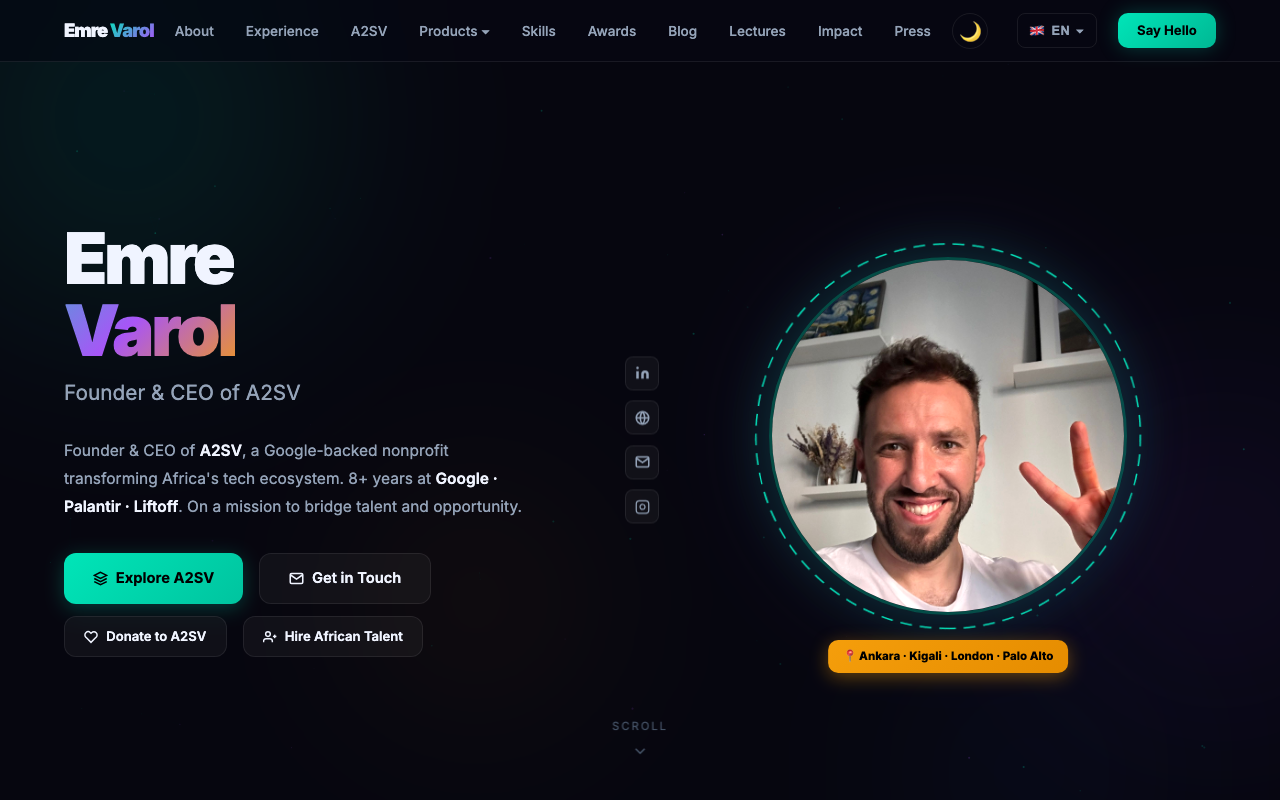
Personal brand, lectures, writing, proof
Personal brand, lectures, writing, and proof for useful AI products.
Project: Engram
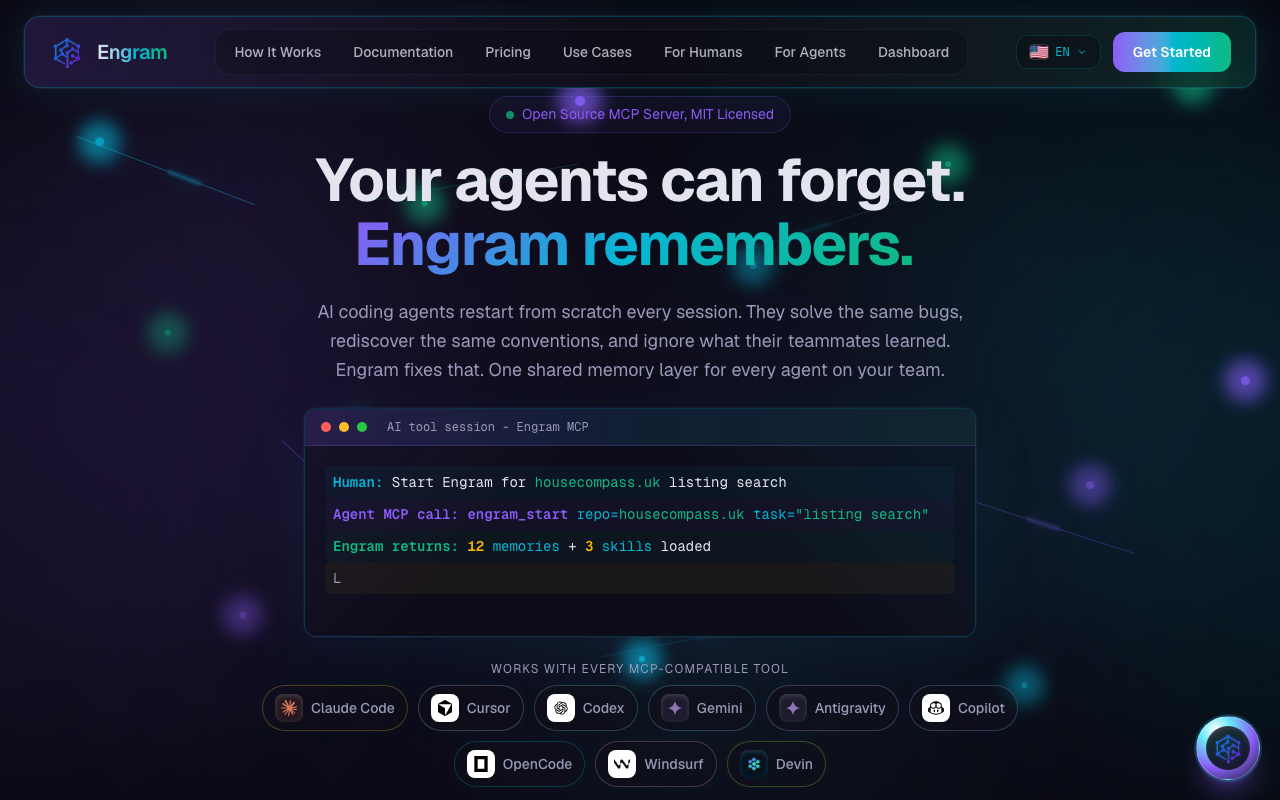
Shared memory for AI coding agents
Long-term memory for AI agents and team knowledge.
Project: evimibul.org
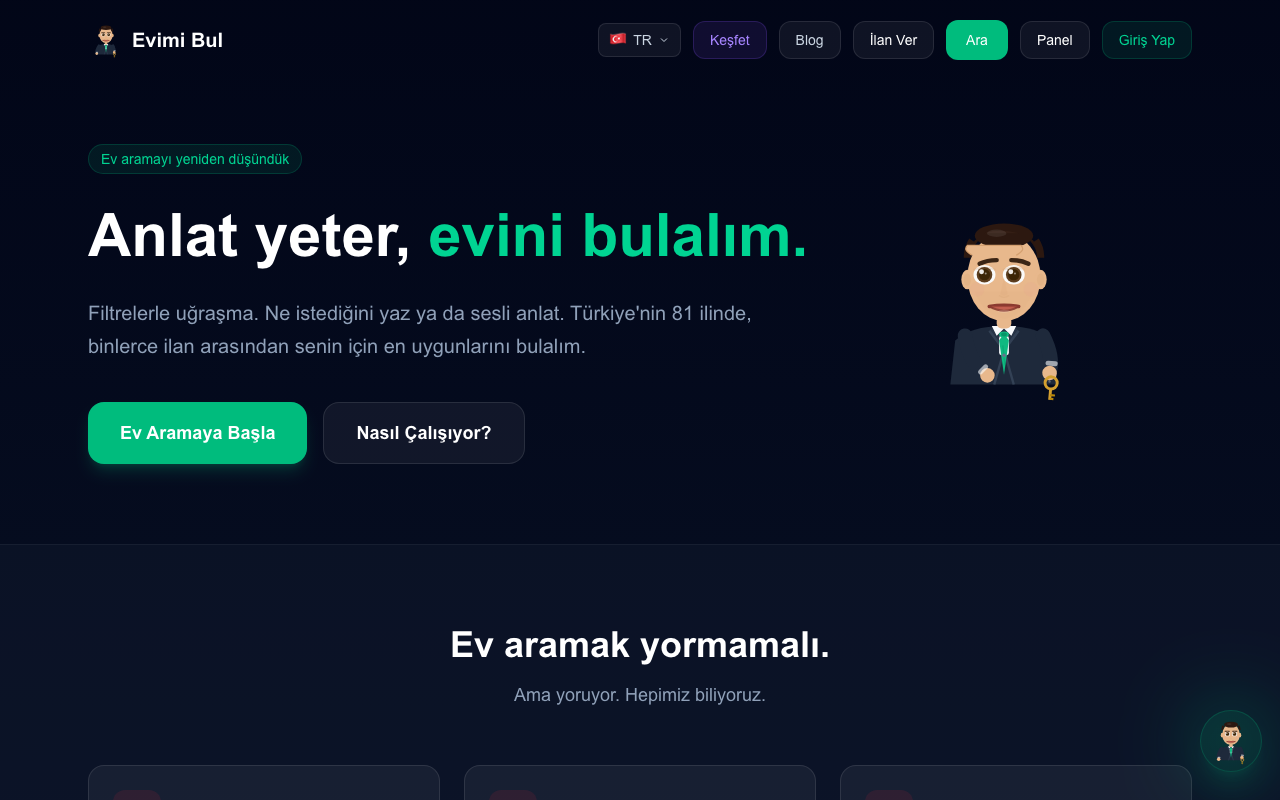
AI-powered real estate search
AI-powered real estate search and decision support for Turkey.
Project: english.cash
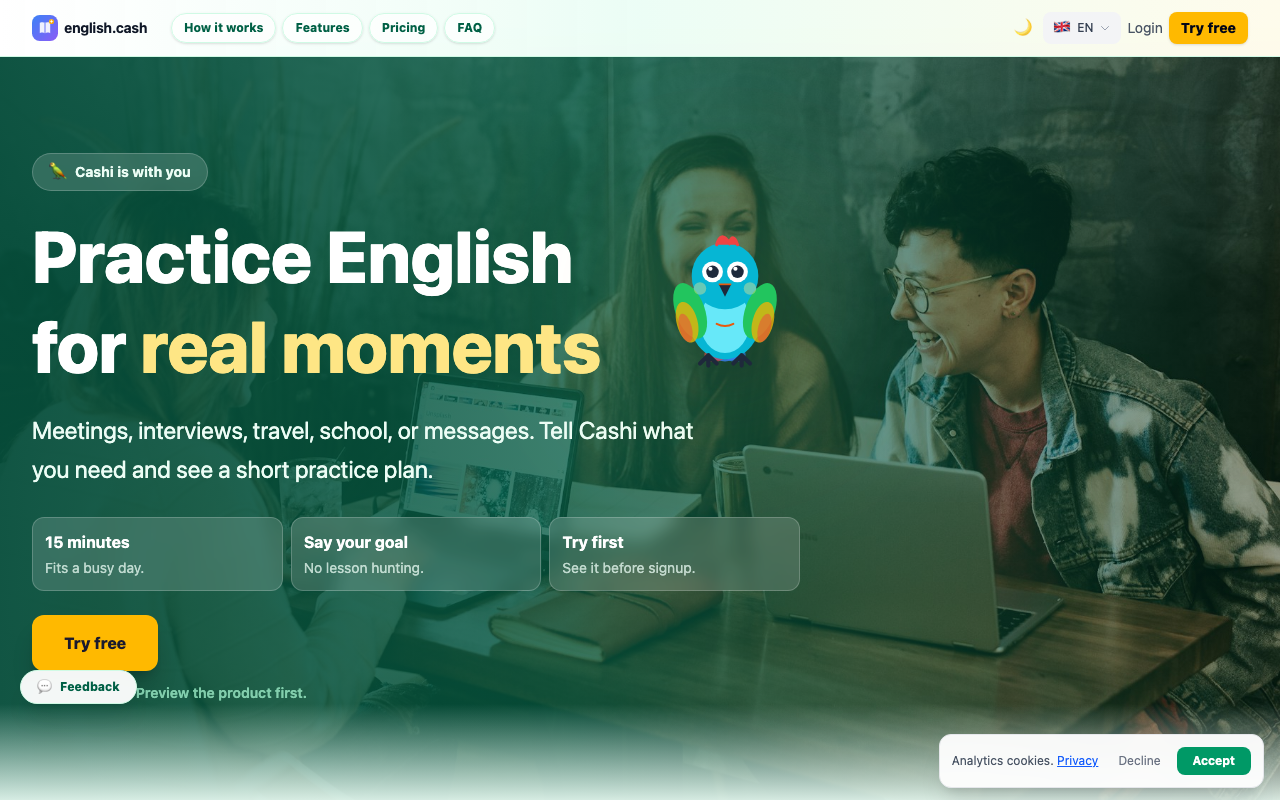
AI English learning for the global workforce
Practical, personal, accessible AI English learning.
The Pattern Across Projects
Different domains, same working model:
1. Start with a real human need
2. Describe the behavior clearly
3. Prototype quickly with AI
4. Test the product through behavior
5. Improve with logs, small commits, and memory
Time Comparison
Weeks became hours. Months became days.
emrevarol.com
Taste + content
evimibul.org
Search UX
english.cash
Learning loops
engram.tools
Memory system
Advanced Patterns & Tips
Practical techniques to get the most out of AI coding tools.
Parallel Agents with GenAI
Need to translate to 9 languages? Don’t do it one by one.
# Claude Code can spawn sub-agents that work in parallel
> Translate the lecture page to all 9 supported languages
  (TR, FR, DE, ES, AR, PT, RW, SW, AM). Use parallel agents
  for each language.

# Result: 9 agents work simultaneously
# 36 files translated in ~5 minutes instead of ~45 minutes
Context Is Everything
The AI is only as good as the context you give it.
AGENTS.md / CLAUDE.md - project-level instructions, tech stack, rules
Engram - shared long-term memory across agents and sessions
Memory files - persistent knowledge across conversations
Clear prompts - specific, behavior-focused descriptions
Existing code - the AI reads your codebase and follows your patterns
# Bad context: starting from scratch every time
> make a page

# Good context: AI knows your project inside and out
> Add a /friends page similar to /leaderboard. Show mutual friends
  at the top, then suggested friends based on similar learning paths.
  Use the existing FriendRequest model.
When AI Gets Stuck
It happens. Here’s what to do:
Simplify the prompt - break it into smaller pieces
Give examples - show what you want, not just describe it
Share error messages - paste the exact error, AI is great at debugging
Try a different approach - “instead of X, try Y”
Start fresh - sometimes a new conversation with clear context works better
Debugging with AI
AI is an incredible debugger.
# Just paste the error and describe the context
> I'm getting this error when I click the Buy button:
  "TypeError: Cannot read properties of undefined (reading 'price')"
  This happens only when the market has no trades yet.

# The AI will:
# 1. Find the relevant file
# 2. Identify the bug
# 3. Fix it
# 4. Explain what went wrong
Multi-File Changes
One of AI’s biggest advantages: it edits many files atomically.
> Add a "favorites" feature. Users can bookmark listings.
  Show a heart icon on each listing card, a /favorites page
  with saved listings, and a count badge in the navbar.

# AI will modify in one go:
# - schema.prisma (new Favorite model)
# - API route (CRUD for favorites)
# - ListingCard component (heart button)
# - Navbar (favorites count)
# - New /favorites page
# - Database migration
What NOT to Do with AI
Don’t paste AI-generated code into Stack Overflow answers (it’s not yours)
Don’t skip testing because “the AI wrote it”
Don’t use AI for security-critical code without expert review
Don’t stop learning fundamentals - you need to understand what you’re building
Don’t give up after one failed attempt - rephrase and try again
Don’t try to build everything in one giant prompt
Production Safety (1/2)
Real incidents from building these projects with AI.
1. Always Have Backups
git push --force destroyed a live site (Impact page, Press page, GenAI lecture — gone)
Recovery was only possible because Vercel kept old deployments and a second clone existed
Rule: Never force push. Never rebase shared branches. Always have a rollback strategy.
2. Guard Your API Keys
AI models can autonomously use API keys and rack up thousands of dollars without you realizing
Rule: Set spending limits. Use separate keys per project. Monitor usage daily.
Production Safety (2/2)
3. Log Everything & Generate Reports
You need daily activity reports and finance reports — know what your AI agents did and what they spent
Use services like Resend to email yourself automated daily summaries
Rule: If you can’t see what happened yesterday, you’re flying blind.
The Human’s Irreplaceable Role
AI cannot replace you in these areas:
Vision - What should we build? Why? (for now)
Empathy - What do users actually need? (for now)
Judgment - Is this the right approach? (for now)
Taste - Does this feel right? Is it good enough? (for now)
Lessons From Real Builds
Local first
Before any deploy, run the project locally and verify the exact screen or flow you changed.
Diff + screenshot + test
Do not accept “done” from an agent. Review the diff, inspect the UI, and run the relevant check.
Secrets stay server-side
Provider keys belong in env vars and serverless routes, never in browser JavaScript.
Localization needs smoke tests
Key parity is not enough. Check visible copy, overflow, emoji/icons, and mobile layout.
Reuse the chatbot pattern
If every project needs a context-aware bot, standardize provider rotation, rate limits, prompts, and UI once.
Key Takeaways
1. Manual coding is no longer the bottleneck; clear product judgment is.
2. Describe behavior, not implementation details.
3. Make one small change, run it, then continue.
4. Review outcomes with screenshots, tests, logs, and real local state.
5. Keep secrets on the server and costs observable.
6. Treat localization and mobile layout as product work, not a string replace.
7. Use reusable patterns for chatbots, provider rotation, and agent memory.
8. Add Engram when the project has decisions worth remembering.
9. Guard your API keys.
10. Always have rollback and backups.
Your Homework
Build something real this week.
Day 1: Setup
Install OpenCode, then try Codex and Claude Code on the same small project.
Day 2-3: Build
Pick a simple idea (personal site, todo app, calculator). Build it entirely with AI. Follow the iteration cycle.
Day 4-5: Expand
Add 3 features incrementally. Test each one. Commit after each.
Day 6-7: Deploy
Deploy to Vercel or Netlify. Share the URL. Show the world.
Resources
Agents
OpenCode: opencode.ai/download
Codex: github.com/openai/codex
Claude Code: code.claude.com/docs
Antigravity: antigravity.google
Bonus: Memory & context
Bonus: Engram: Engram is a memory layer for AI agents. It keeps repo rules, decisions, gotchas, and solved errors available across sessions.
Use it after the first project becomes real.
Rule: AGENTS.md / CLAUDE.md
Live projects
emrevarol.com
engram.tools
evimibul.org
english.cash
This lecture
emrevarol.com/lecture/coding-with-genai.html
Use the slide chat to ask context-aware questions while you review.
Final Words
The future belongs to people who can clearly describe valuable tools, verify outcomes, and keep humans at the center.
Your operating system
OpenCode first. Codex for repo work. Claude Code for deep sessions. Antigravity for Google workflows. Engram for memory.
Thank You
Ask better questions. Ship better tools.
Use AI to expand human agency: learning, work, decisions, and access to services.